Welcome to LunaFinder
What is LunaFinder?
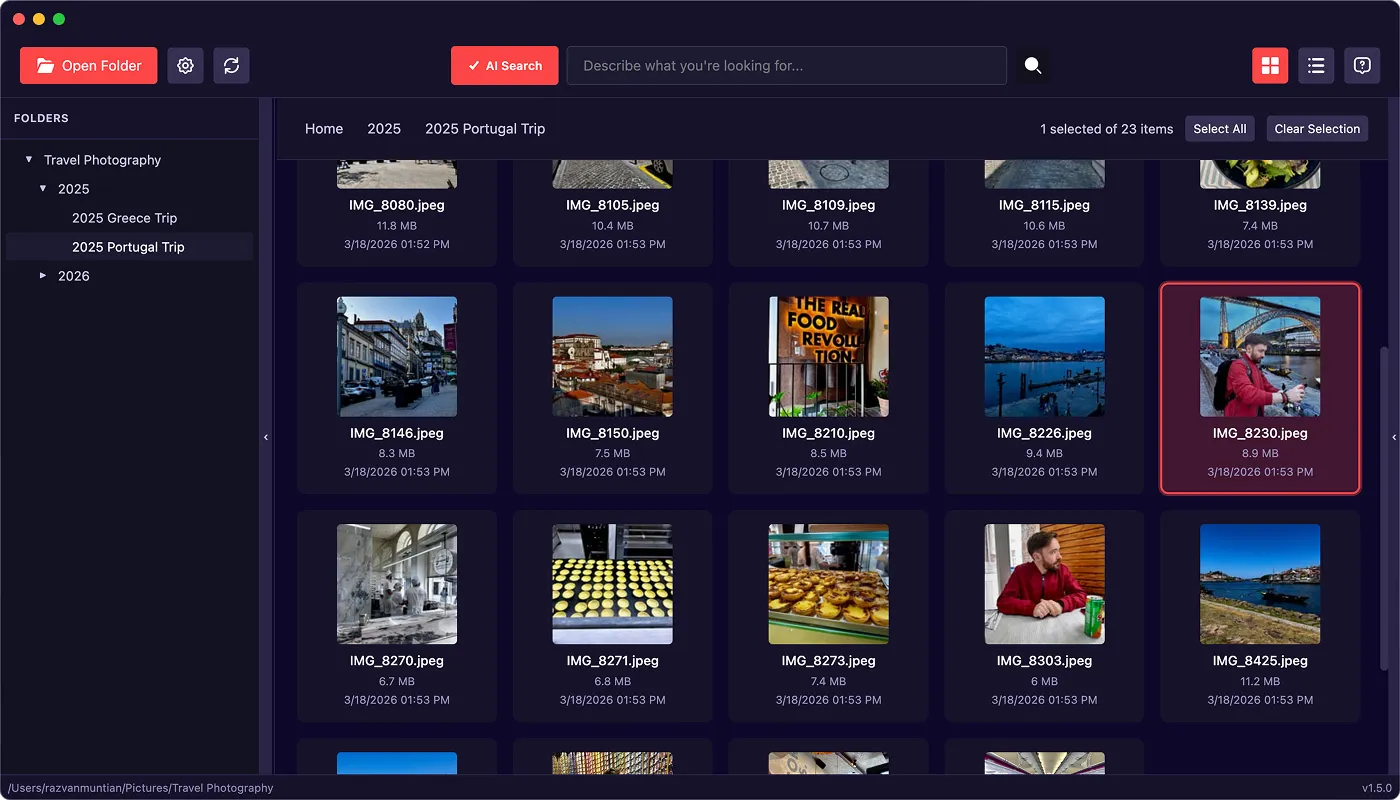
LunaFinder is a desktop photo explorer for macOS. It helps you browse folders of images on your computer, add searchable keywords, and find photos quickly, without relying on expensive cloud storage or manual Lightroom-style workflows.
Think of it as a focused tool for finding, tagging, and using your photos when they live on external drives, backup folders, or synced folders on your Mac.
The problem LunaFinder solves
Many people store years of photos across:
- External hard drives
- Backup copies in nested folders
- Local folders that sync with services like Dropbox or Google Drive
Over time it becomes hard to remember where a specific photo lives, or to gather the right images when you need them for social posts, client work, or personal archives. Cloud photo libraries can also get costly when you need terabytes of storage.
LunaFinder is built for local folders you already have. Everything runs on your Mac. Your files are not uploaded to LunaFinder’s servers for browsing or tagging.
Who LunaFinder is for
LunaFinder works well if you:
- Photographers who want to mark and retrieve their best shots
- Social media managers juggling large image sets
- Content creators who need a reliable way to organize and reuse photos
- Travelers and digital nomads with big collections from trips and adventures
If your goal is to load a folder, search or tag photos, and get images out quickly, LunaFinder is designed for that workflow.
Main capabilities at a glance
| Capability | What it means for you |
|---|---|
| Open any folder | Point LunaFinder at an existing photo library on disk |
| AI Search | Describe what you want in plain language and LunaFinder finds matching images |
| Keywords | Add your custom tags. This is a non-destructive operation: keywords are stored in custom files, and the original image remains unchanged. |
| Fast preview | Open full-size previews and move between photos with the keyboard |
| Copy for posting | Copy image content to the clipboard for pasting into social apps or documents |
| Bulk tagging | Apply or remove keywords on many photos at once |
| Keyboard-first design | Shortcuts for search, preview, copy, and navigation |
macOS only
LunaFinder is available only for Mac for now. You need a Mac running a supported version of macOS to install and use the app.
How LunaFinder differs from a full photo editor
LunaFinder is not a replacement for Photoshop or a complete replacement for Adobe Lightroom’s develop tools. It focuses on what many people miss most from Lightroom’s library side: organization, search, and quick retrieval, especially when files stay on your own drives.
What you need before you start
- A license key (you receive this when you purchase LunaFinder)
- An internet connection for first-time activation (and for optional AI Search model download)
- A folder on your Mac (or connected drive) that contains your images
Next steps
- Activating your license — unlock the app with your license key
- Your first photo library — open a folder and start browsing